
Machine Learning ML-09.01
Images as tensors
To a network, an image is a grid of numbers: pixels, channels, the (N, C, H, W) layout and why pixel values are normalized before training.
The big idea
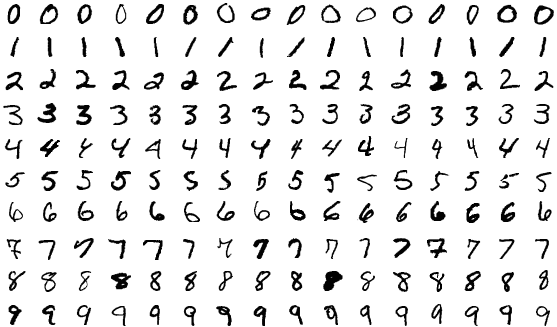
You see a handwritten zero. A computer sees a table of numbers. Each small square of the image, a pixelPicture element: one cell of the grid that makes up a digital image, holding a brightness value (grayscale) or several colour values., holds a brightness value, and the image is nothing more than the grid of those values. Everything a vision model does, from recognizing digits to finding tumours, starts from that grid.
Think of a mosaic made of tiles. From across the room you see a face; up close, each tile is a single flat colour. The model only ever gets the list of tile colours in order, and must learn which arrangements mean "face".

How it works
Step 1: A grayscale image is a 2D grid
A grayscale image of height H and width W is an H by W array. The digits in the code are 8 by 8 with values from 0 to 16; MNIST digits are 28 by 28 with values from 0 to 255. Each value is one input number to the model, so a 28 by 28 image is 784 inputs.
Step 2: Colour adds channels
A colour image stores three numbers per pixel: red, green and blue intensity, usually 0 to 255 each. Each of those is a channelOne layer of values in an image tensor, such as the red, green or blue intensities, or one feature map inside a network., and the image becomes a 3D array: a 224 by 224 photo is 224 x 224 x 3 = 150,528 numbers. Inside a network, the number of channels grows: a layer might output 64 or 512 channels, each a map of where some learned pattern appears.
Step 3: The (N, C, H, W) layout
Networks process images in batches, so the data becomes a 4D tensorA multi-dimensional array of numbers with a shape, such as (N, C, H, W) for a batch of images.. PyTorch uses (N, C, H, W): batch size, channels, height, width. A batch of 32 RGB photos at 224 by 224 has shape (32, 3, 224, 224).
Image files decode into channels-last order, (H, W, C), so a transpose is usually part of loading. TensorFlow defaults to channels-last (N, H, W, C). Neither is right or wrong, but mixing them up is one of the most common vision bugs: the model happily treats image rows as colour channels. In the code, a (224, 224, 3) decoded image becomes (3, 224, 224) with one transpose and (1, 3, 224, 224) with an added batch dimension.
Step 4: Normalize pixel values
Raw pixels are integers from 0 to 255. Networks train better on small, centred inputs ( Feature engineering ), so two steps are standard:
- Convert to floats and divide by 255, giving values from 0 to 1.
- Standardize each channel: subtract the channel mean and divide by its standard deviation, computed on the training set.
Pretrained models expect the exact statistics they were trained with: the widely used ImageNet values are means (0.485, 0.456, 0.406) and standard deviations (0.229, 0.224, 0.225) for red, green and blue. Feeding a pretrained model differently normalized inputs silently costs accuracy.
Going deeper
Code: digits, layouts and normalization
import numpy as np
from sklearn.datasets import load_digits

# A grayscale image is a 2D grid of numbers: here 8x8 pixels with values 0 (no ink) to 16 (full ink)
digits = load_digits()
img = digits.images[0]
print("label:", digits.target[0], " shape:", img.shape, " dtype:", img.dtype)
print(img.astype(int))

# A batch of grayscale images in (N, C, H, W) layout: N images, 1 channel, 8x8
batch = digits.images[:32][:, None, :, :]
print("\nbatch shape (N, C, H, W):", batch.shape)

# A colour image is H x W x 3 when loaded from a file (channels last) ...
rng = np.random.default_rng(0)
rgb = rng.integers(0, 256, size=(224, 224, 3), dtype=np.uint8)   # stand-in for a decoded photo
print("decoded photo shape (H, W, C):", rgb.shape, rgb.dtype, "values", rgb.min(), "to", rgb.max())
# ... and most frameworks want channels first: (C, H, W), then a batch dimension
chw = rgb.transpose(2, 0, 1)
print("channels first (C, H, W):", chw.shape, "  as a batch:", chw[None].shape)
print(f"numbers in one 224x224 RGB image: {chw.size:,}  ({chw.size * 4 / 1e6:.2f} MB as float32)")

# Normalization: scale to [0, 1], then standardize each channel with statistics of the training set
x = chw.astype(np.float32) / 255.0
mean, std = x.mean((1, 2), keepdims=True), x.std((1, 2), keepdims=True)  # here: from this one image
xn = (x - mean) / std   # pretrained ImageNet models instead use fixed means (0.485, 0.456, 0.406)
print("\nafter /255:        min %.2f max %.2f" % (x.min(), x.max()))
print("channel means", np.round(mean.ravel(), 3), " stds", np.round(std.ravel(), 3))
print("after standardize: per-channel mean", np.round(xn.mean((1, 2)), 2) + 0.0, " std", np.round(xn.std((1, 2)), 2))
Output
label: 0  shape: (8, 8)  dtype: float64
[[ 0  0  5 13  9  1  0  0]
 [ 0  0 13 15 10 15  5  0]
 [ 0  3 15  2  0 11  8  0]
 [ 0  4 12  0  0  8  8  0]
 [ 0  5  8  0  0  9  8  0]
 [ 0  4 11  0  1 12  7  0]
 [ 0  2 14  5 10 12  0  0]
 [ 0  0  6 13 10  0  0  0]]

batch shape (N, C, H, W): (32, 1, 8, 8)
decoded photo shape (H, W, C): (224, 224, 3) uint8 values 0 to 255
channels first (C, H, W): (3, 224, 224)   as a batch: (1, 3, 224, 224)
numbers in one 224x224 RGB image: 150,528  (0.60 MB as float32)

after /255:        min 0.00 max 1.00
channel means [0.497 0.5   0.499]  stds [0.29  0.291 0.29 ]
after standardize: per-channel mean [0. 0. 0.]  std [1. 1. 1.]
The printed 8 by 8 array is the zero from Figure 1. The colour part uses random pixels as a stand-in for a decoded photo, so its channel means sit near 0.5; after standardizing with its own statistics, each channel has mean 0 and standard deviation 1. One 224 by 224 RGB image is 150,528 numbers, 0.60 MB as 32-bit floats, so a batch of 256 is about 154 MB before the network computes anything.
Why not just flatten?
You could flatten an image into one long vector and feed it to the multi-layer networks of Multi-layer networks . That works for tiny digits, but it throws away the grid: the network no longer knows which pixels are neighbours, and a 224 by 224 RGB input connected to 1,000 hidden units needs 150 million weights in the first layer alone. Convolutions ( Convolutions ) keep the grid and reuse a small set of weights everywhere.
Resolution and resizing
Models expect a fixed input size, so images are resized (and often cropped) during loading. Higher resolution keeps detail but costs compute that grows with H x W. Resizing can also distort: squashing a wide photo into a square changes shapes, which is why "resize the short side, then centre-crop" is common.
Trade-offs
| Option | Wins when | Loses when |
|---|---|---|
| Channels first (N, C, H, W) | PyTorch and many GPU kernels | Needs a transpose from decoded files |
| Channels last (N, H, W, C) | Matches image files; TensorFlow default; some hardware prefers it | Must convert when mixing frameworks |
| Low resolution | Fast training and inference, small memory | Fine details and small objects are lost |
| High resolution | Small objects, medical and satellite images | Compute and memory grow with H x W |
Common mistakes
- Feeding (H, W, C) arrays to a model that expects (C, H, W).
- Forgetting to divide by 255, or dividing twice.
- Using different normalization at inference than in training, or than a pretrained model expects.
- Loading images as BGR (some libraries' default) when the model was trained on RGB.
- Computing normalization statistics on the test set instead of the training set.
In the wild
Every vision pipeline starts with this decoding and tensor conversion step: phone camera apps, medical imaging systems, document scanners and self-driving perception stacks. Pretrained model libraries ship each model with its expected input size and normalization constants, precisely because mismatches here are so common and so silent.
Check yourself
-
What is the shape of a batch of 16 RGB images of 64 by 64 pixels in PyTorch's layout?
Show answer
B. (16, 3, 64, 64) PyTorch uses (N, C, H, W): 16 images, 3 channels, 64 by 64.
-
How many numbers are in one 32 by 32 RGB image?
Show answer
B. 3,072 32 x 32 pixels x 3 channels = 3,072 values.
-
A pixel's red value is 128. With ImageNet normalization (mean 0.485, std 0.229 for red), what does it become?
Show answer
B. About 0.07 128 / 255 = 0.502, minus 0.485 = 0.017, divided by 0.229 is about 0.074.
-
A model loads fine but its accuracy is near chance on images that look correct. Which bug fits best?
Show answer
B. Channels and height swapped by a wrong layout, or wrong normalization Layout and normalization bugs do not crash; they just feed the model scrambled or mis-scaled numbers.
Recap
- An image is a grid of pixel values; grayscale has one channel, colour has three.
- Batches are 4D tensors; PyTorch uses (N, C, H, W), files decode as (H, W, C).
- Scale pixels to 0 to 1 and standardize each channel with training-set (or pretrained-model) statistics.
- Flattening loses the grid and needs huge weight matrices; convolutions keep the spatial structure.
- Layout and normalization mismatches fail silently, so check them first.